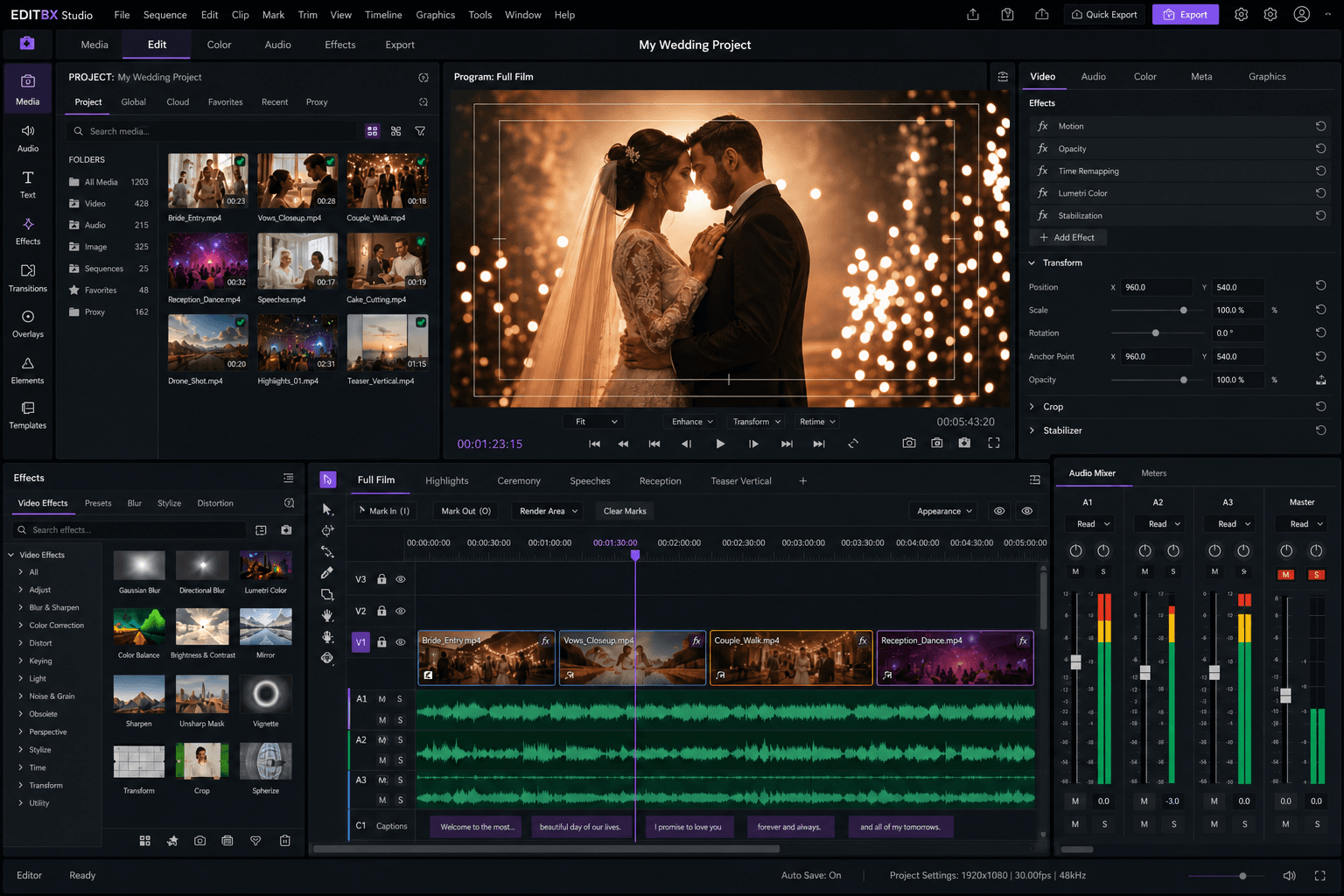
The wedding-first professional NLE — engineered for fast delivery, smooth playback, and studio trust

EDITBX Studio for wedding, socialand creative filmmakers.

A zero-copy GPU pipeline, fused GLSL effects, studio-grade color tools, assistive editing, proxy workflows, and client-ready export bundles in one focused desktop editor.

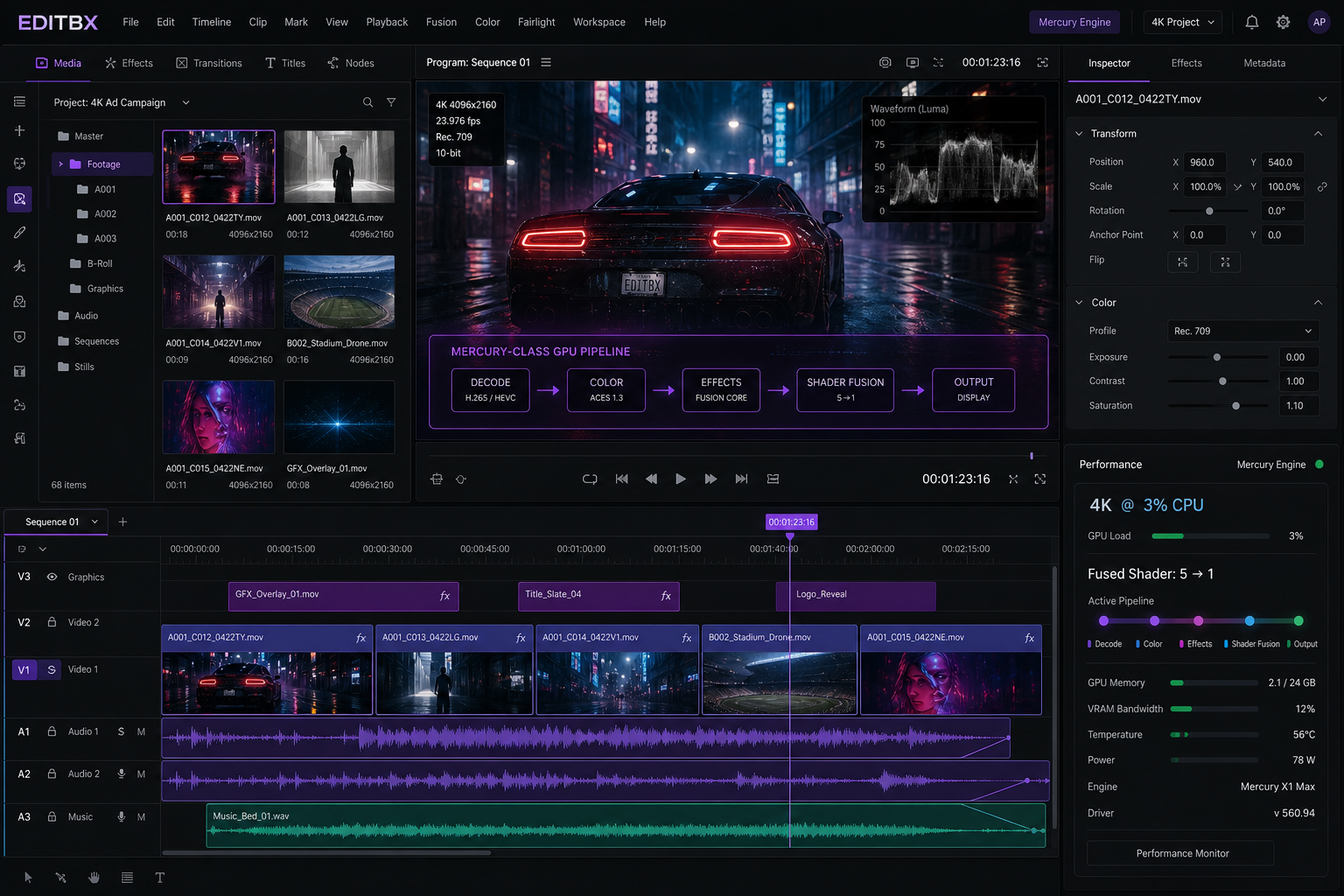
4K @ 3%

CPU usage

Zero-copy GPU pipeline on macOS & Windows

5 → 1

fused shader pass

Effect stack compiled into one GLSL program

60 fps

with scopes open

GPU compute scopes — zero playback hit

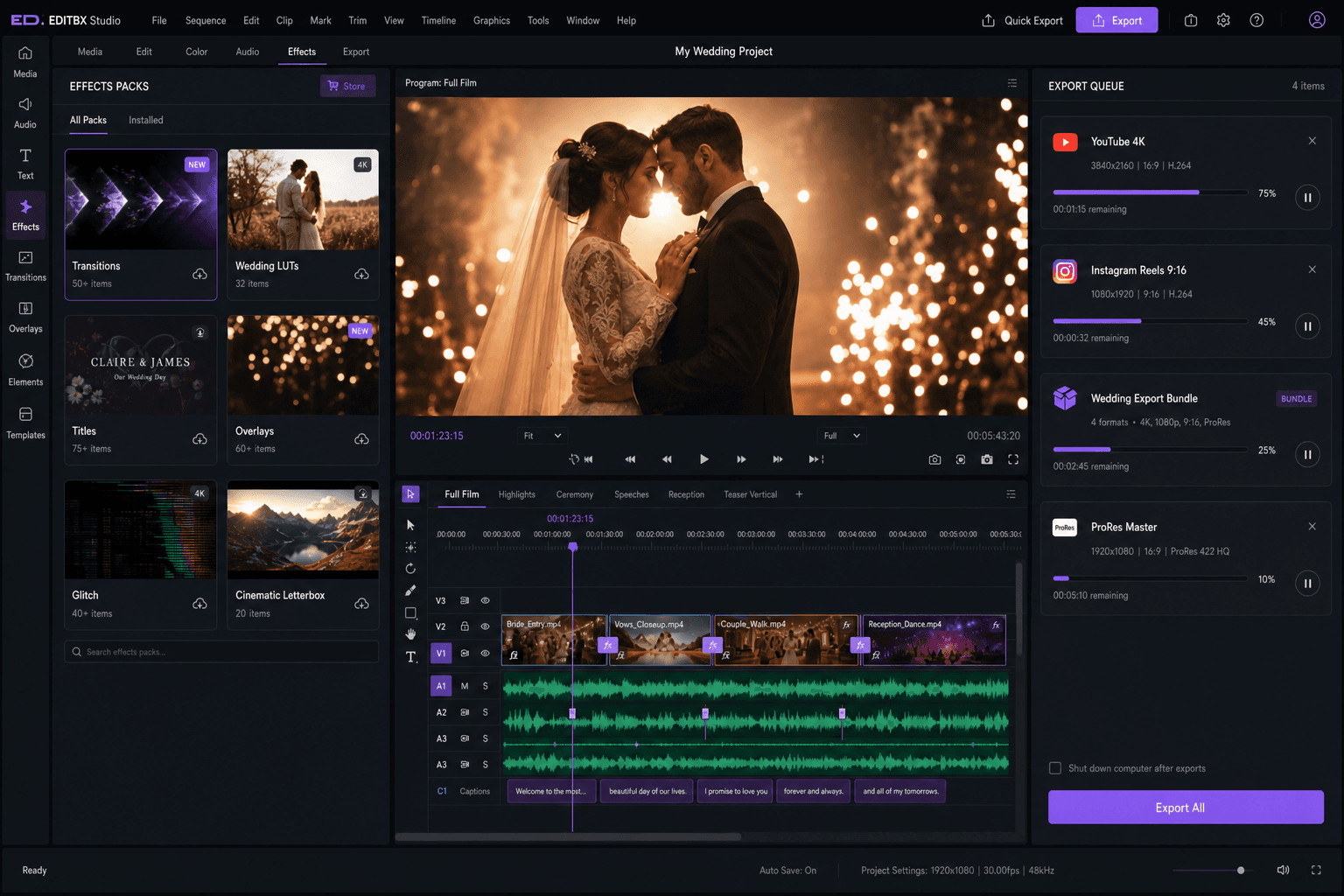
macOS ARM64Windows x64Native desktop appLive previewWedding Export Bundle

Native desktop editor · macOS ARM64 & Windows x64 · Built for wedding studios and social creators

Splash previewv1.0
EDITBX Studio splash
Loading
Opening your project library0%

Launch status

Preparing your edit workspace

Runs on

macOS & Windows

  • Opening your project library...
  • Starting preview monitor
  • Syncing edit proxies
  • Loading wedding delivery presets
  • Workspace ready

Why editors choose EDITBX

Smooth playback

Long timelines, mixed wedding footage

Live effects preview

See looks while you edit

Wedding bundle

Full film, reels & masters

Proxy workflow

Fast scrub on any machine

Color & LUTs

Cinematic grades & wedding looks

Setting up your workspace…EDITBX Studio

3%

CPU on 4K

Zero-copy IOSurface / D3D11 path

5 → 1

fused shader

Effect stack collapsed into one pass

0 ms

shader compile on restart

Persistent GL pipeline binary cache

256-bin

GPU histogram

Scopes panel costs zero playback fps

Wedding Export BundleMulticam syncProxy workflowLive previewColor & LUTsAudio mixerSocial reelsBackground exportPack marketplaceCrash recoveryWedding Export BundleMulticam syncProxy workflowLive previewColor & LUTsAudio mixerSocial reelsBackground exportPack marketplaceCrash recovery
New visuals

Website-ready feature scenes for the proeditor story.

These images now anchor the product story around the strongest shipped areas: 4K playback, color finishing, Fusion-style VFX, and audio-to-delivery workflow.

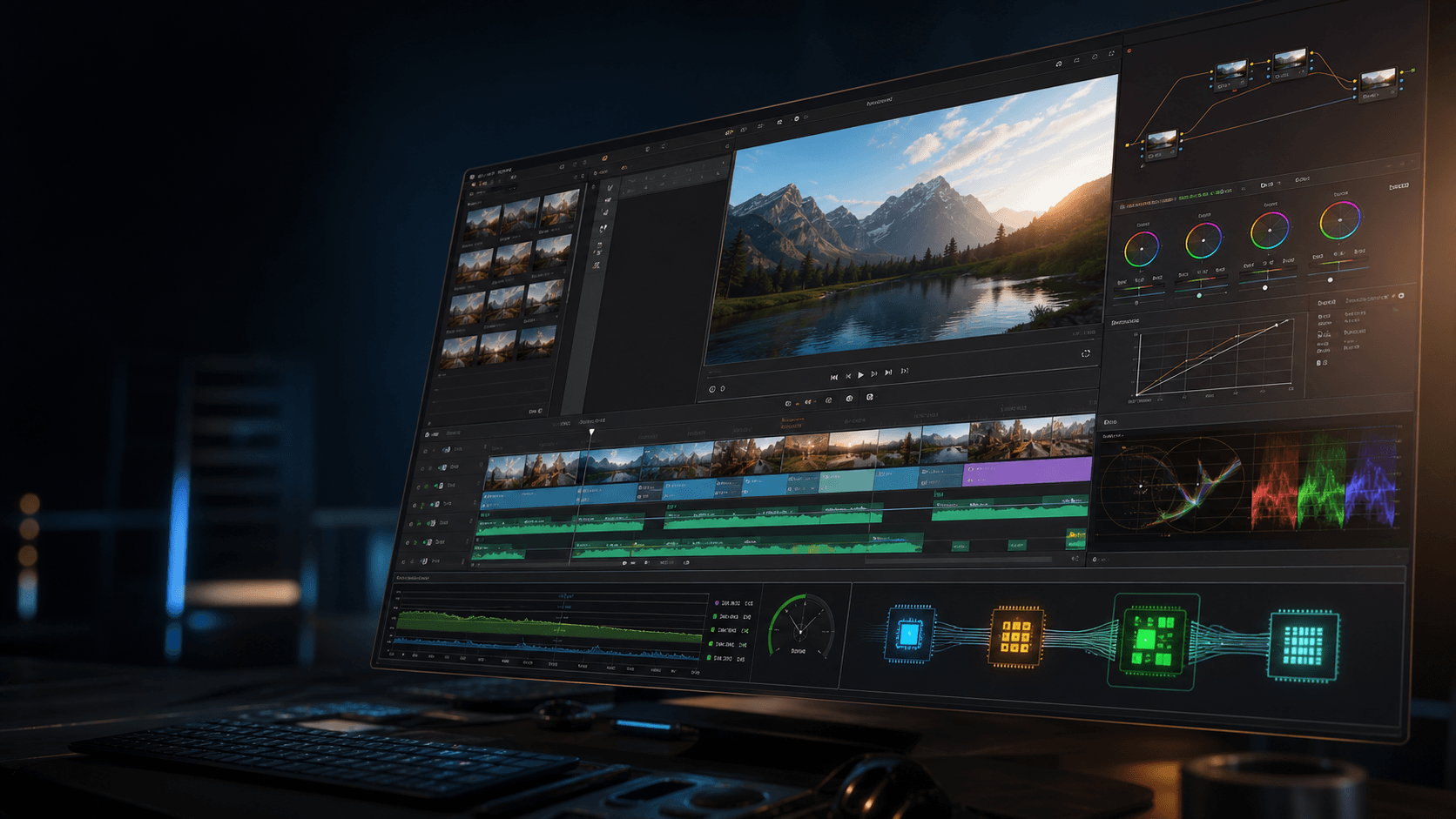
EDITBX 4K playback engine

Performance

4K playback engine

Proxy-first decode, cache-aware playback, and GPU preview routing for smooth 4K sessions.

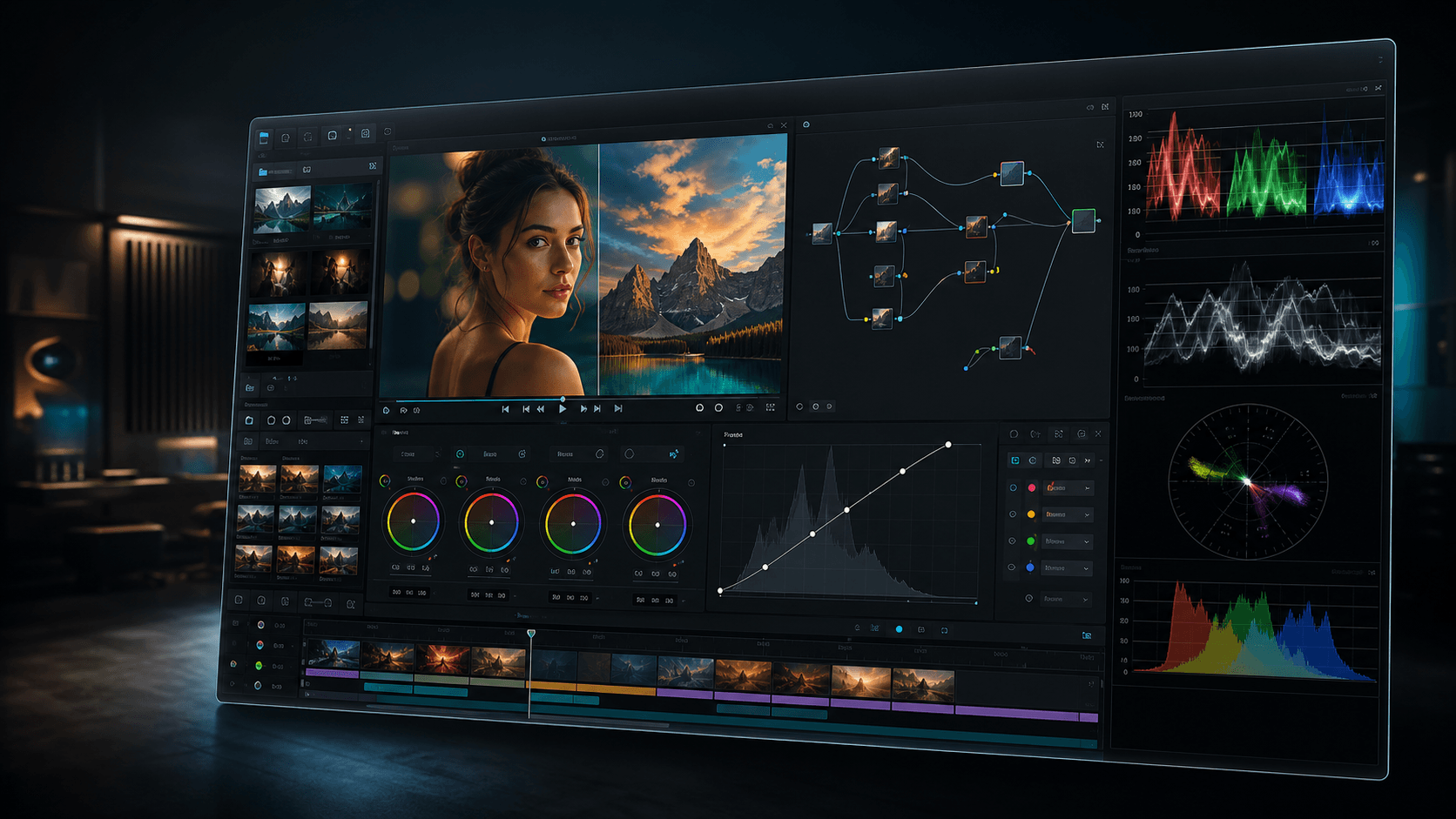
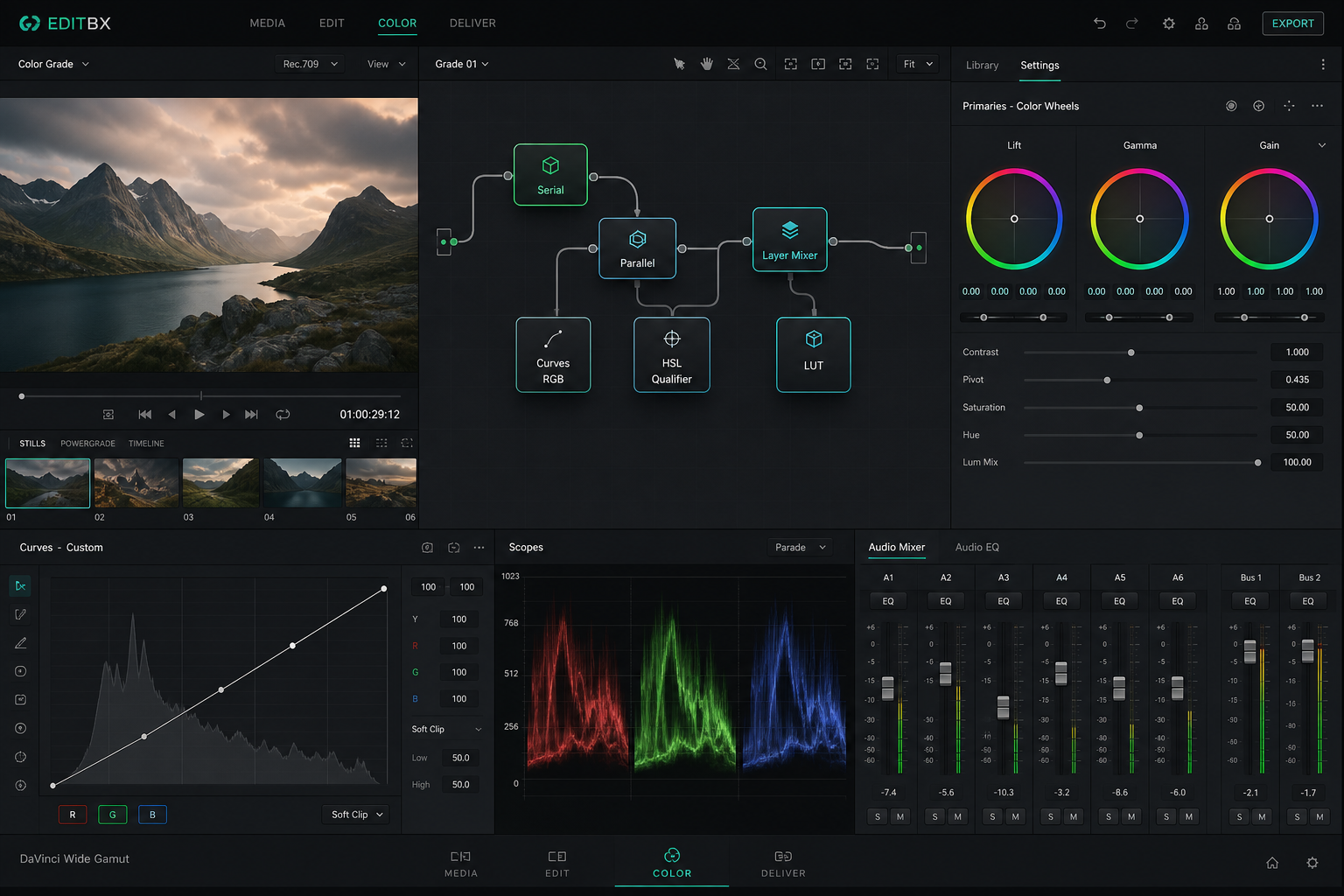
EDITBX Color finishing

Color

Color finishing

Curves, scopes, wheels, LUTs, and display trim for a richer finishing page.

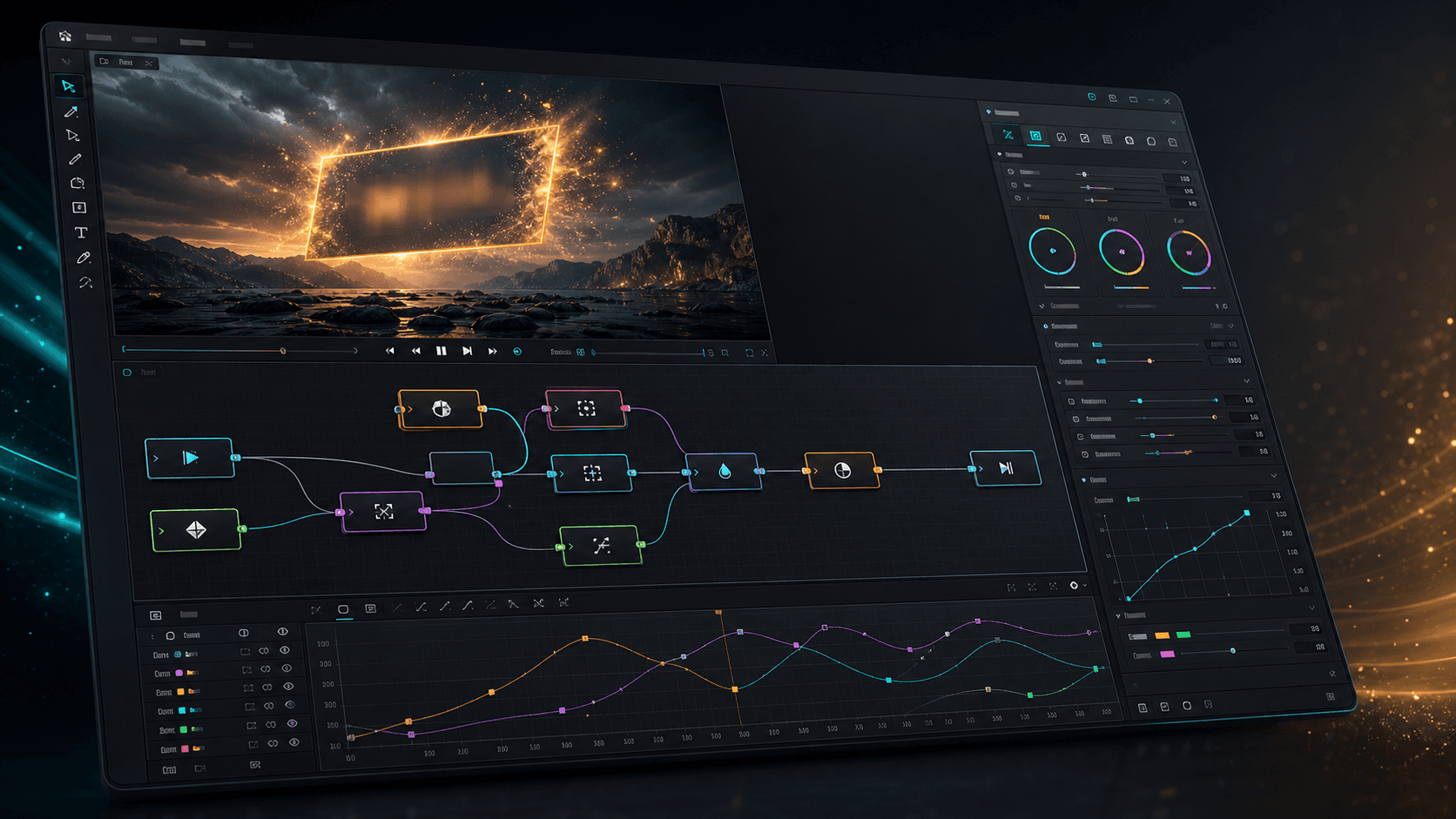
EDITBX Fusion VFX

VFX

Fusion VFX

Node compositing, masks, transforms, spline keyframes, and GLSL preview tools.

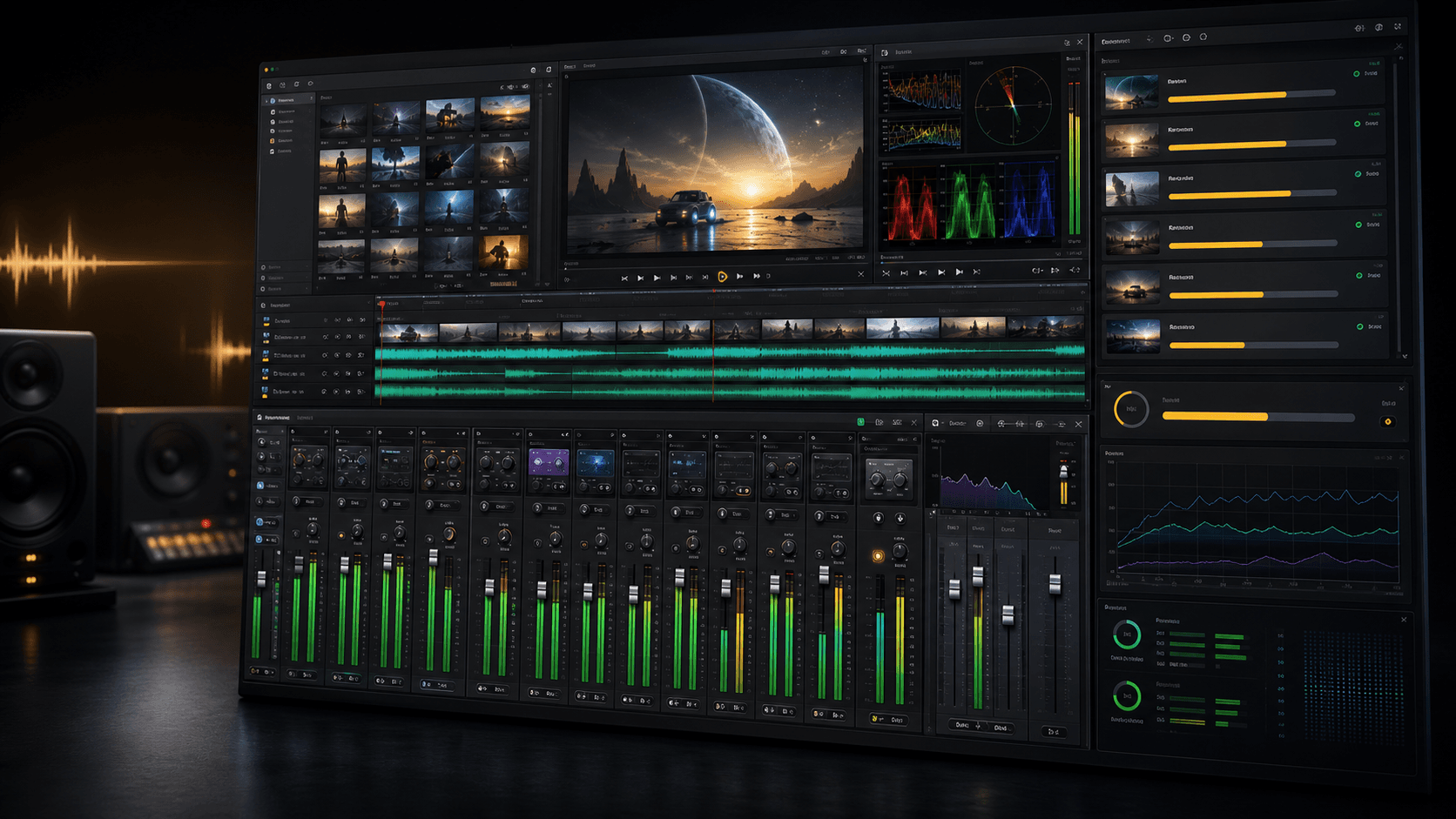
EDITBX Audio & deliver

Finishing

Audio & deliver

Mixer meters, waveform timelines, render queue cards, and delivery status in one view.

Why EDITBX

Focus beats feature sprawl for wedding& social delivery.

EDITBX is a precision tool built around the edit sessions you repeat every week: sync, cut, grade, mix, export, and hand off without rebuilding your pipeline.

Wedding delivery shortcut

Queue Master 1080p, ProRes archive, 9:16 social, and WAV audio from the active sequence — plus manifest and delivery checklist folders.

vs. five manual export jobs

Proxy-first speed

Edit on proxies, scrub long timelines, and reconnect to camera originals without rebuilding your session.

vs. heavy full-res timelines

Focused creative stack

Timeline, color, audio, packs, and export — everything a wedding or social editor needs, nothing you will never open.

vs. 47-app generalist suites

Performance

GPU playback, shader, 4K speed

EDITBX zero-copy GPU pipeline running 4K at 3% CPU

Zero-copy GPU pipeline

macOS IOSurface and Windows D3D11 interop hand decoded frames straight to the GPU — 4K and 8K playback at roughly 3% CPU.

3-stage async playback

Decode → upload → render run in parallel with GL fence-sync. No stalls between stages, no dropped frames at the cut.

Fused effect shader compiler

A 5-effect stack collapses into a single fragment shader pass. EDITBX keeps stacked looks efficient instead of rebinding a program for every small effect.

Persistent GL binary cache

Compiled GL pipelines persist on disk. App restart means instant playback — zero shader-compile pauses, ever.

GPU compute scopes

Waveform, vectorscope, RGB parade, and 256-bin histogram render on the GPU. Opening Scopes costs zero playback fps.

Smart Render disk cache

Graded frames persist between sessions. Re-open a project and jump back into playback without waiting on the same render work again.

Instant 4K preview

4K source decoded downscaled inside sws_scale — no proxy wait, no transcode queue, no waiting on a render bar.

Decoder pre-warmup

The next clip's decoder is warmed at every cut so the timeline never trips on a clip boundary.

True bidirectional J-K-L

Shuttle from -8× through 8× with audio muted on reverse — the real broadcast feel, not a forward-only shortcut.

Color & Audio

Color node graph + audio post

EDITBX color node graph with serial and parallel nodes

Studio-grade Color Node Graph

Serial and parallel nodes, Layer Mixer, RGB / HueSat / LumVsSat Curves, HSL Qualifier, Power Windows, Tracker, and LUT nodes.

ACES, HDR10 & HLG pipeline

Project-level IDT → working space → ODT. Export H.265 with HDR10 PQ or HLG metadata embedded for true HDR delivery.

Studio-grade audio post

Per-track 4-band parametric EQ, compressor, limiter, reverb, sends, buses, and a real master bus — built in.

AI Voice Isolate

Built-in voice isolation and noise removal. Strip wind, AC hum, and crowd from vows in one click.

Real-time audio scrubbing

Sample-accurate scrubbing across vows, speeches, and music so dialogue timing stays natural while you trim.

Cross-platform GL 3.3 + GLSL

Identical color pipeline on macOS and Windows — same look, same nodes, same export, no “Mac-only” surprise.

AI & Creative

Auto-Cut, captions, reframe

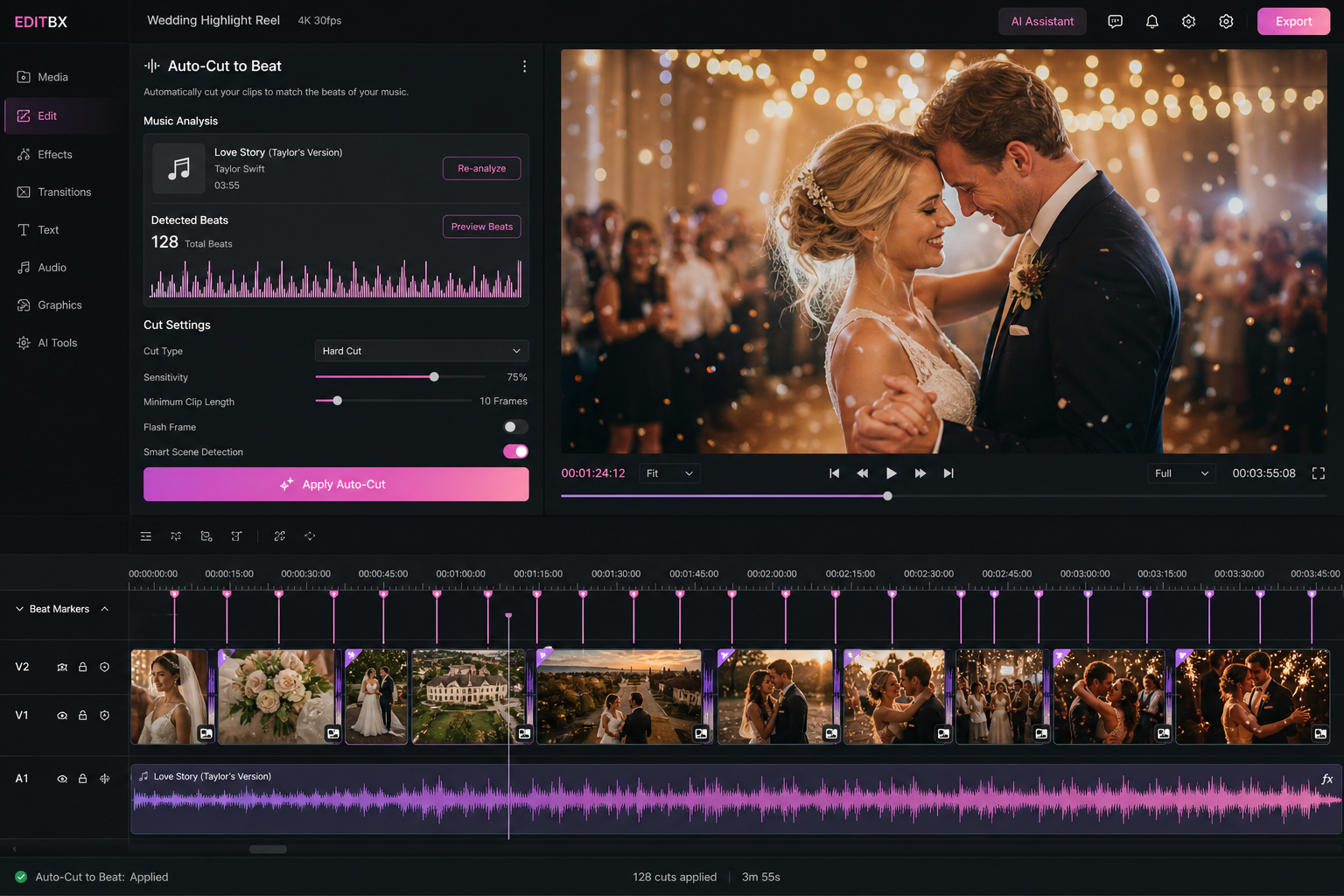
EDITBX AI Auto-Cut to Beat assembling a wedding highlight reel

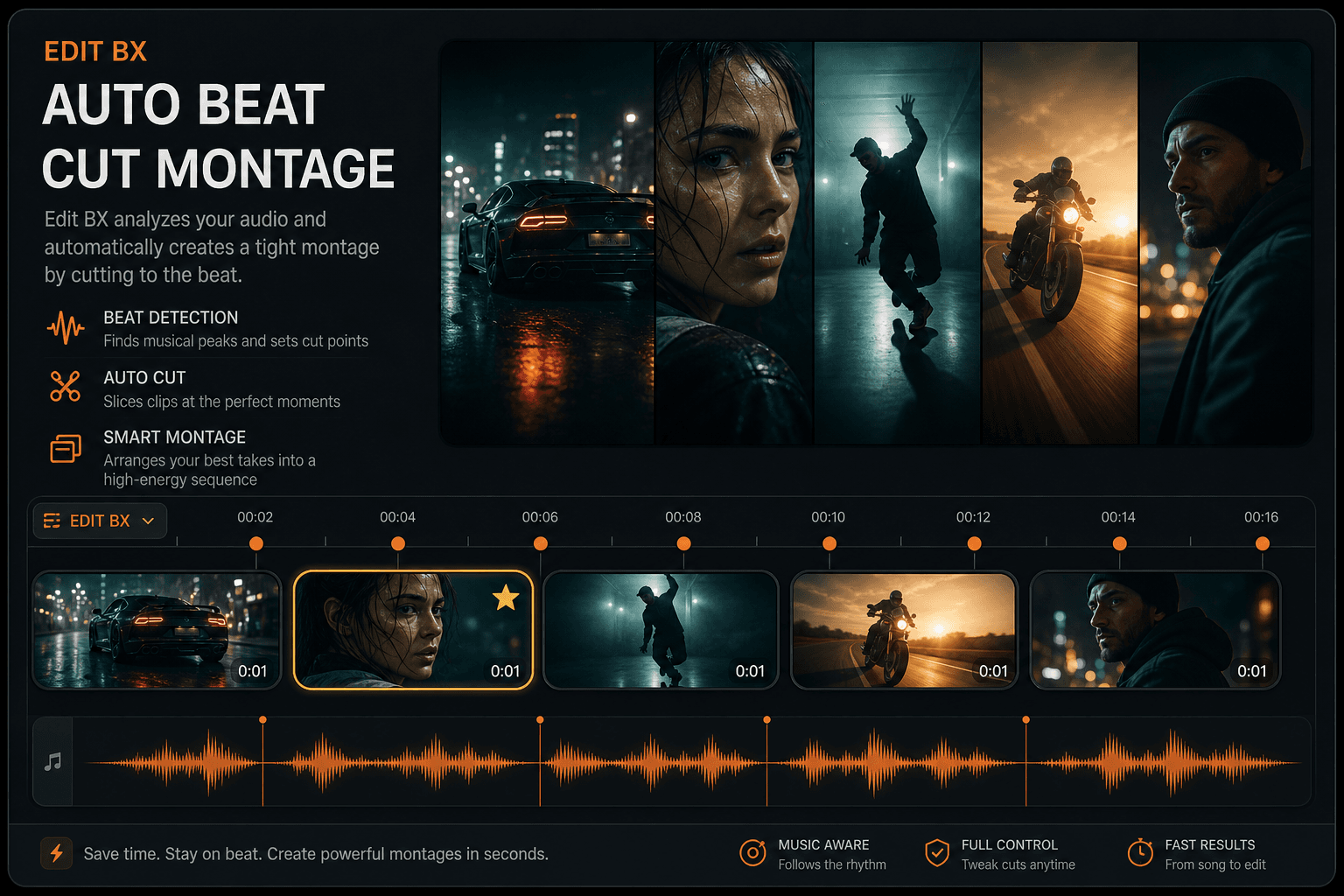
AI Auto-Cut to Beat

Drag clips and a song onto the timeline — EDITBX detects beats and lays down a beat-cut sequence in seconds. Reel-ready, wedding-ready.

Speech-to-text captions

Built-in transcription workflow. Drop a clip, get editable burn-in captions — no upload, no API key.

AI Auto-Reframe

Reframe 16:9 to 9:16, 1:1, 4:5, or 2.39:1 cinemascope with subject tracking. One-click vertical delivery.

Optical Flow Speed Remap

Optical-flow slow motion creates intermediate frames where the camera left gaps. Ideal for silky bridal-walk re-times.

Adjustment Layers

Dedicated adjustment-layer track — drop a grade, a look, or a vignette and it cascades over everything below.

Object & planar tracker

Point and planar tracking for masks, callouts, and signage replacement — no external round-trip.

Workflow

Multicam, AAF, command palette

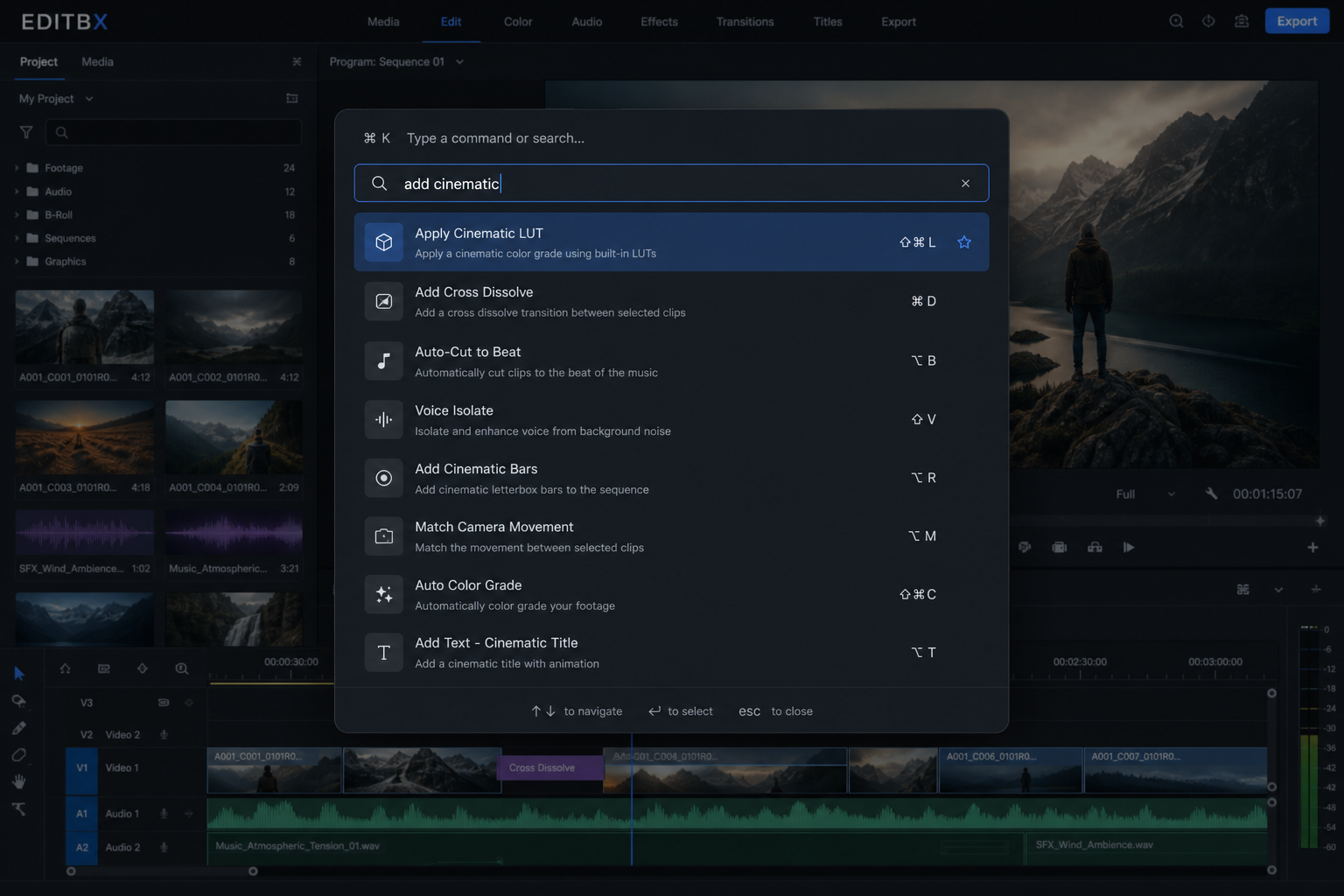
EDITBX Command Palette with searchable actions

Live Multicam angle switch

Hit keys 1-9 during playback to cut to camera angles in real time — fully undoable, perfect for wedding ceremony cuts.

Native AAF export

AAF written without a third-party SDK for professional handoff, archive, and finishing workflows.

XML / EDL / OTIO

Round-trip with interchange XML, CMX3600 EDL, and OpenTimelineIO — every interchange a working editor expects.

Visual undo-history scrubber

Scrub through your edit history visually and restore important milestones without guessing through a long undo stack.

Command Palette ⌘P / Ctrl+P

Every action — clip, panel, export, transition — searchable from one fast professional command interface.

Universal Inspector search

Find any property on any clip from one search box — no more digging through nested panels mid-deadline.

Scrubbable values everywhere

Drag-to-scrub every numeric input on Inspector, Color, and Effects panels for fast, tactile precision.

Professional dock headers

Slim 22px panel headers — drag to float, double-click to dock, and keep the workspace responsive during long sessions.

Plugin Marketplace UI

Browse and install OpenFX, VST3, and Audio Unit plugins — third-party power without leaving the app.

Compare

The features pros actually switcheditors for.

A short, honest scorecard. EDITBX is built to beat — not pretend to outperform — on the features that change a wedding or social editor's week.

Killer feature
EDITBX
Color Suite
Subscription NLE
Platform Editor
Broadcast NLE
Fused 5→1 shader stack
Yes
No
No
No
No
Studio-grade node graph in trial workflow
Yes
Tiered
No
No
No
AI Auto-Cut from music beats
Yes
No
Limited
No
No
AI Voice Isolate, free & local
Yes
Studio tier
Cloud / sub
No
No
Command Palette ⌘P
Yes
No
No
No
No
Visual undo-history scrubber
Yes
No
No
No
No
Wedding & social template pack
Yes
No
No
No
No
Native AAF export (no SDK)
Yes
Yes
Yes
No
Yes
ACES + HDR10 + HLG end-to-end
Yes
Yes
Partial
Partial
No
Lifetime license available
Yes
Yes
No
Yes
Yes
Made for wedding & social editors

A wedding NLE built for faststudio delivery.

Wedding title presets, Auto-Cut to music, Auto-Reframe for reels, Voice Isolate for outdoor vows, and photo-album sequences — all built into EDITBX.

Wedding title & social pack

Save-the-date titles, ceremony lower thirds, reception graphics, social captions, and a photo-album Ken Burns sequence.

Auto-Cut to your wedding song

Drop the song + the clips folder — EDITBX assembles a beat-cut highlight in seconds. Highlight reel in coffee-break time.

Auto-Reframe to Reel

One click 16:9 → 9:16 with face-tracking for vertical delivery — social reels without a re-edit.

Voice Isolate for vows

Strip wind, AC noise, and crowd hum from outdoor vows and speeches in seconds — no plugin, no subscription.

Multicam live switch

Press 1-9 during playback to cut between ceremony angles — the cinematographer's keyboard, finally inside the NLE.

Photo-album Ken Burns

Drop a folder of stills — EDITBX builds a tasteful Ken Burns photo-album sequence ready for reception screens.

Core features

A real editor underneath thecinematic interface.

Smooth playback, dependable timelines, live preview, and delivery workflows built for wedding studios and social creators.

Smooth playback

Built for mixed wedding footage, long timelines, proxy switching, background thumbnails, and dependable export paths.

Live preview

Real-time effects, LUT looks, and smooth timeline monitoring for creative edits.

Proxy workflow

Fast edit proxies, responsive scrubbing, cache-aware playback, and reconnect-friendly project handling.

Wedding Export Bundle

From the active sequence: Master 1080p, ProRes archive, Social 9:16, WAV audio, folder layout, and delivery manifest.

Multicam editing

Up to 16 camera angles with angle switching. Sync via waveform, timecode, beat markers, or timeline order — results vary by footage.

Color grading & LUTs

Wheels, curves, scopes, wedding looks, and split before/after compare in the program monitor.

Audio mixer

Track mixing, meters, gain staging, loudness guidance, and practical controls for dialogue and music.

AI assistant

Beat analysis, caption drafts via speech-to-text or SRT, scene-cut hints, and rule-based edit suggestions — assistive, not automatic.

Autosave & crash recovery

Rescue snapshots, recovery prompts, session protection, and long-project reliability built into the core.

Background export

Queue exports while continuing work, track progress, and keep delivery jobs isolated from editing.

Social reels workflow

Vertical reframing, reel sequences, phone-safe exports, and social-first finishing paths.

Pack marketplace

Transitions, looks, titles, overlays, and creative packs organized for real editing sessions.

Performance

Built for theedit bay.

Smooth playback, live preview, audio metering, export queues, and wedding delivery polish — the details your clients never see but always feel.

Smooth playback

Proxy workflows, responsive scrubbing, and stable preview even on long wedding timelines.

Split compare

Before/after split view in the program monitor — compare raw source against graded and effects preview.

Live effects

Real-time looks, color presets, transitions, and creative packs on the timeline.

Recovery

Autosave snapshots, crash rescue, safe export queues, and delivery manifest checks.

Engineering trust

Production-safe editing from ingestto delivery.

The strongest EDITBX story is stability, smooth preview, clear licensing, wedding delivery, and honest feature status. Every product promise maps back to systems built for real client work.

4K workflow

Playback engine discipline

FFmpeg decode workers, frame ring buffers, proxy switching, cache warmup, and timeline scrubbing are presented as the core of the product, not hidden behind vague speed claims.

cache safe

Cache-aware editing

Thumbnail, waveform, proxy, and render caches are treated as production systems with limits, recovery paths, and predictable behavior on long sessions.

client ready

Export queue reliability

Background exports, delivery manifests, format presets, and failure recovery messaging help editors trust the final handoff.

no fake tools

Honest feature states

Experimental audio, AI, HDR, plugin, or licensing features can be labeled clearly so the website never promises a workflow the desktop app cannot support.

Wedding workflow

From ceremony multicam toclient-ready bundle.

EDITBX leans into the workflow wedding editors repeat every week: organize, sync, cut, polish, reframe, export, and hand off with confidence.

Full Film
Highlights
Ceremony
Reception
Speeches
Social Reels
Local AI · On your machine

AI & Smart Tools — WhatActually Works

Every feature below is wired in the current codebase. Status badges reflect real build capabilities — not marketing fluff. Click any card to preview the artwork.

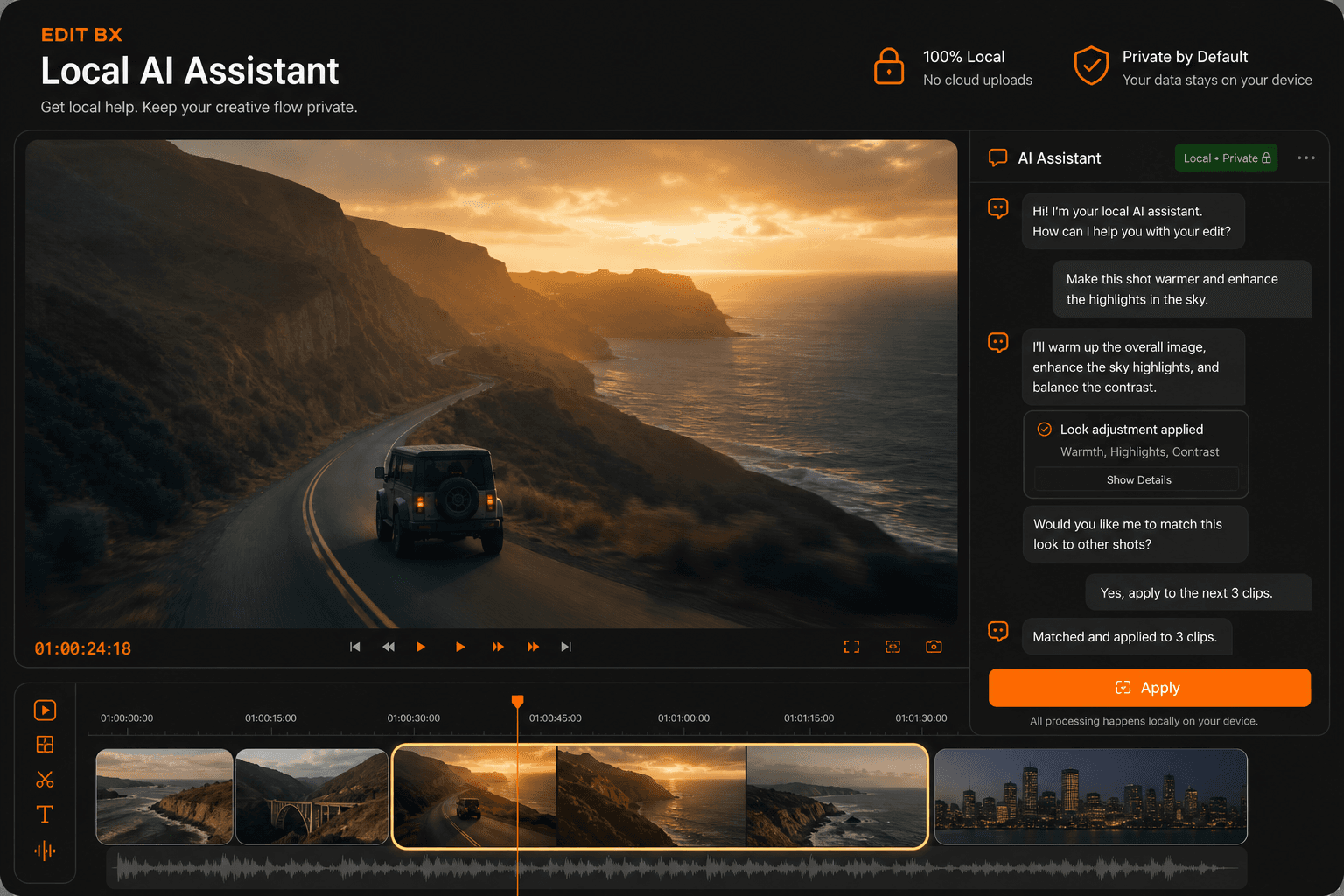
Local AI Assistant
AssistantAvailable

Local AI Assistant

Hybrid chat assistant: built-in fast rules + optional Ollama / LM Studio localhost models. Suggests edits for wedding highlights, reels, export presets, scene/beat markers, color, audio cleanup, and project health — always with Apply + confirm before anything touches your timeline.

Ollama · LM Studio · Built-in GGUF · Offline rules
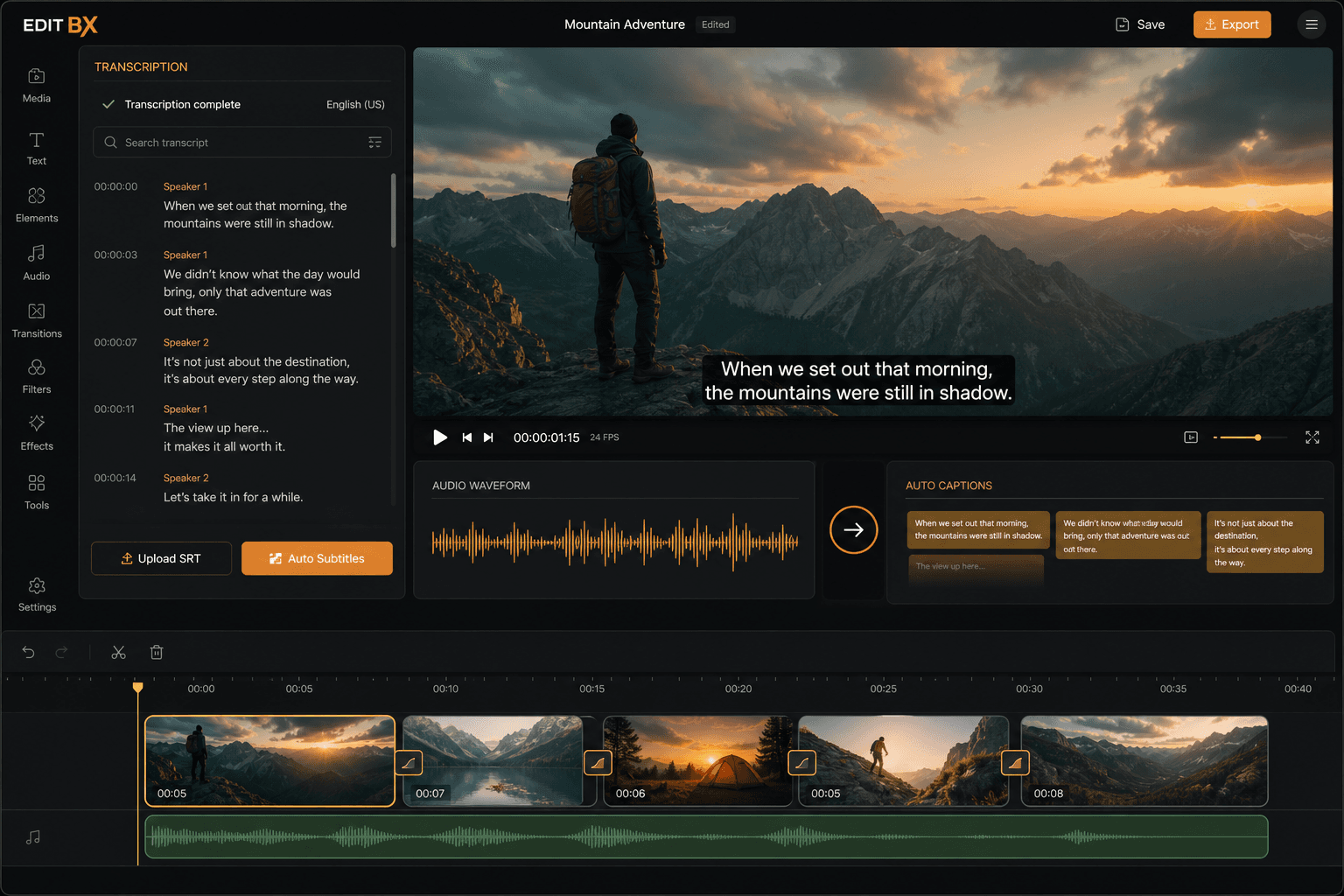
Transcription and Captions
On-DeviceAvailable

Transcription & Captions

Generate caption cues from clip audio using macOS Speech (on-device) or bundled whisper.cpp (ggml-base.en.bin). Writes SRT sidecars and timeline caption tracks. Also powers the AI "Create subtitle" and Social Caption quick commands.

whisper.cpp · macOS Speech · SRT sidecar

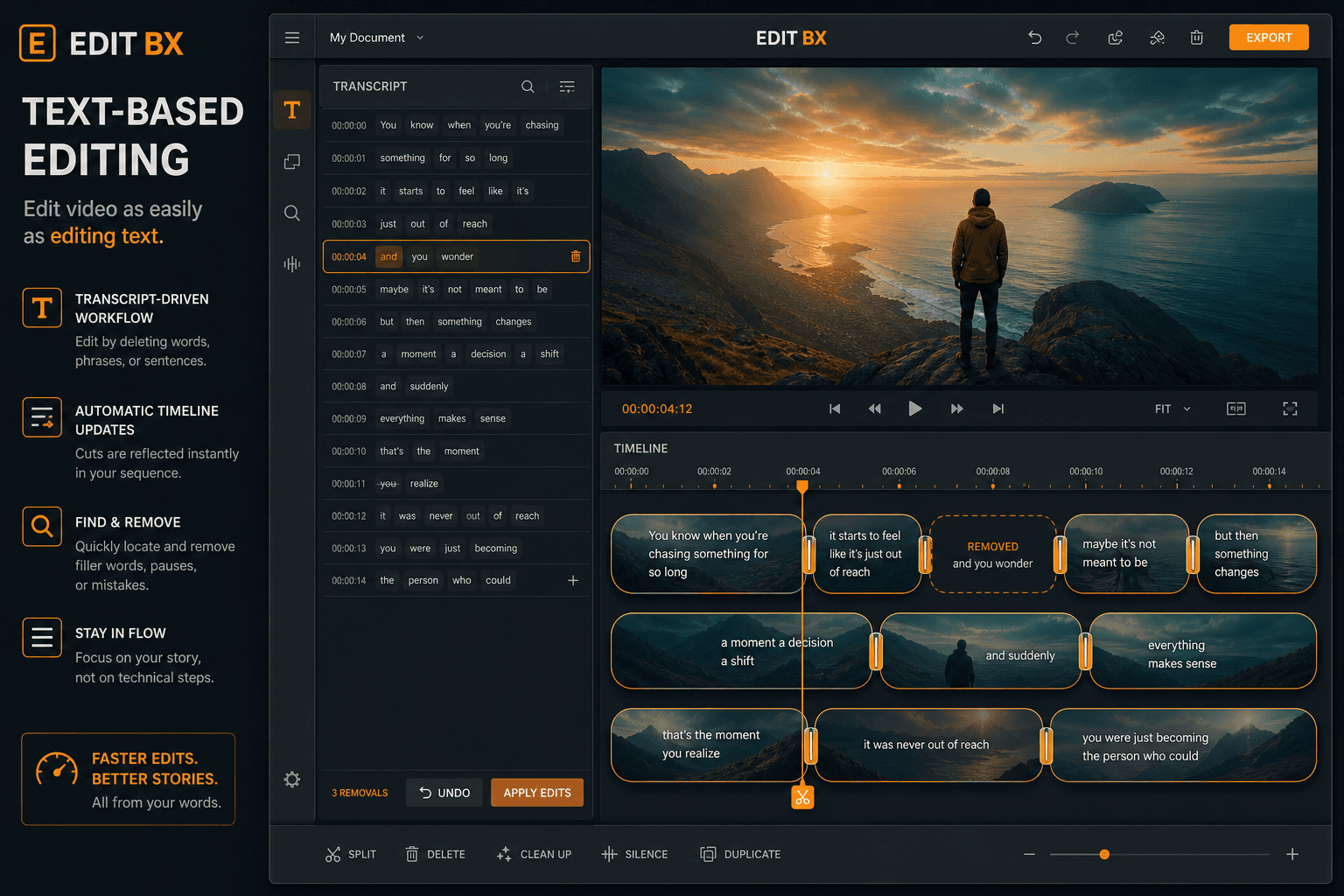
Text-Based Editing
EditingAvailable

Text-Based Editing

Transcribe a clip with word-level timings, open the Transcript panel, select words, and press Delete to ripple-cut those sections from the timeline — like editing a document, not scrubbing frames.

Whisper word timings → Transcript panel → ripple extract

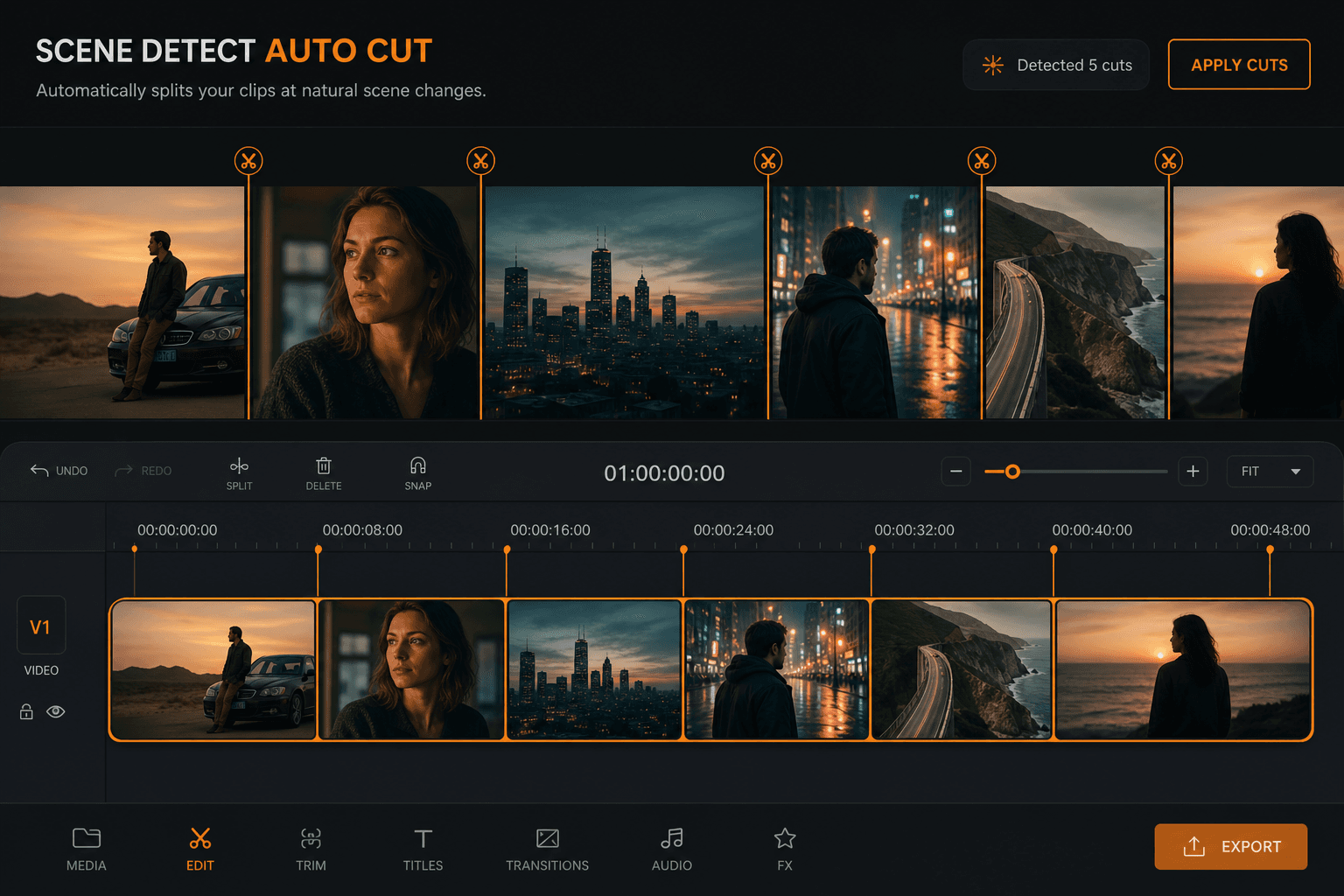
Scene Detect and Auto Cut
EditingAvailable

Scene Detect & Auto Cut

Find shot changes in the selected clip and split at each detected scene boundary. Uses FFmpeg scdet plus OpenCV refinement (or color-stats heuristic when OpenCV is unavailable).

FFmpeg scdet + OpenCV · color-stats fallback

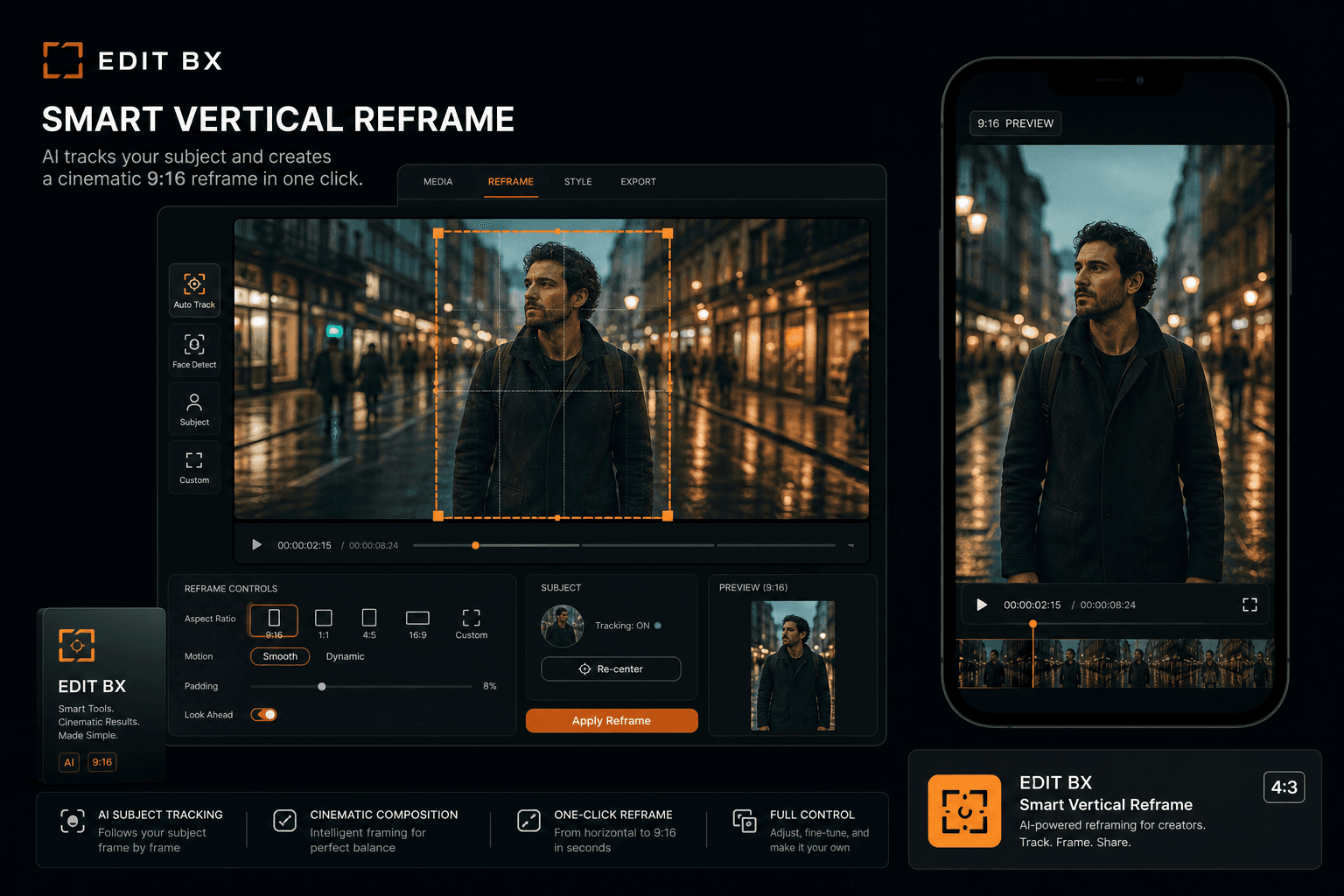
Smart Reframe
EditingAvailable

Smart Reframe (9:16)

Reframe the active sequence to vertical 9:16 for Reels/Shorts/TikTok. With OpenCV: scans people across each clip and writes smoothed transform keyframes. Without OpenCV: center-weighted heuristic crop (honestly labeled).

OpenCV person scan + SmartReframeApply · center heuristic fallback

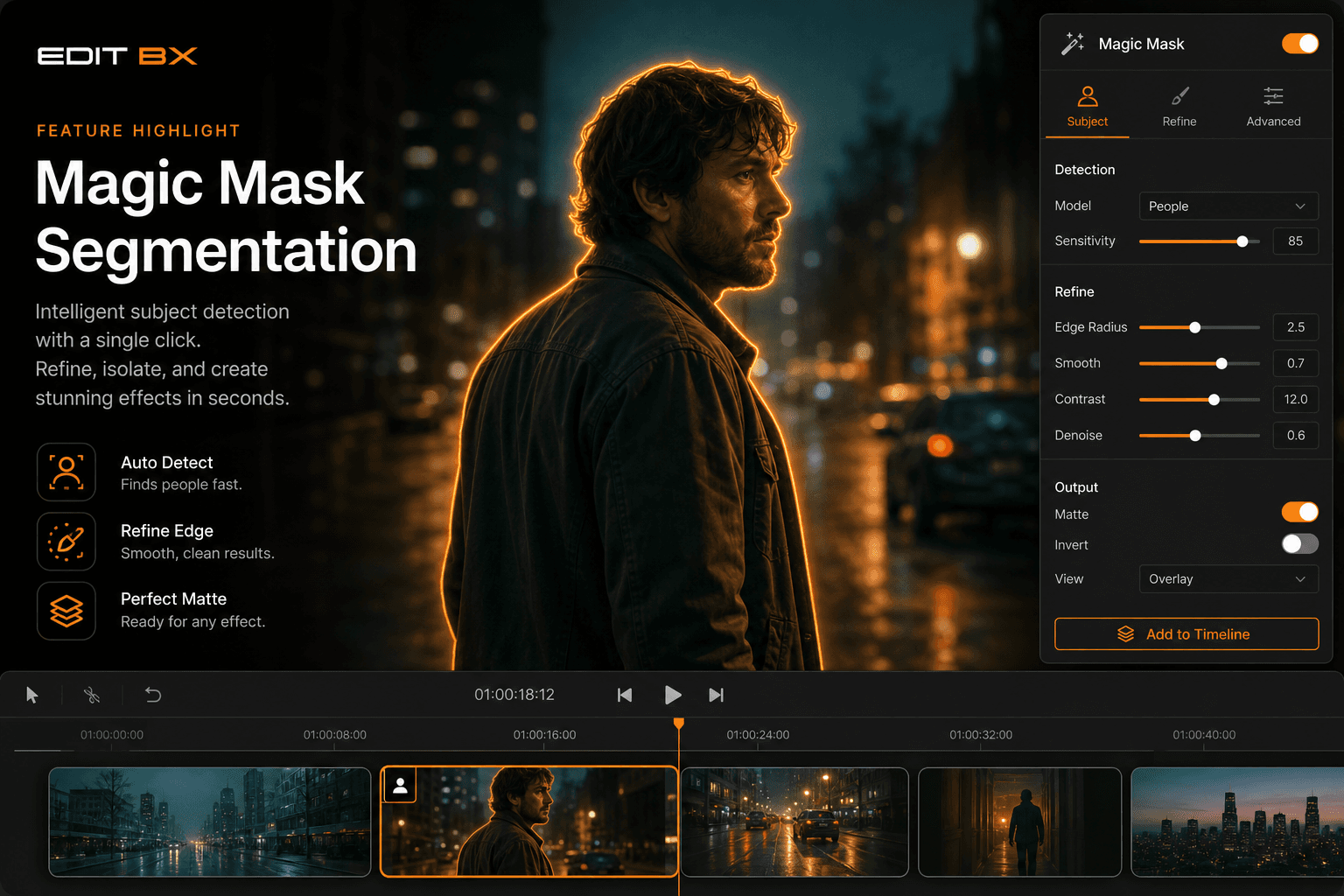
Magic Mask and Segmentation
VisionAvailable

Magic Mask & ML Segmentation

Detect or segment subjects at the playhead and create follow masks for color grading or Fusion. ONNX U²-Net matte when model is present; OpenCV GrabCut fallback; Haar/HOG detect for Fusion mask nodes.

ONNX u2netp.onnx · GrabCut · Haar/HOG → Fusion nodes

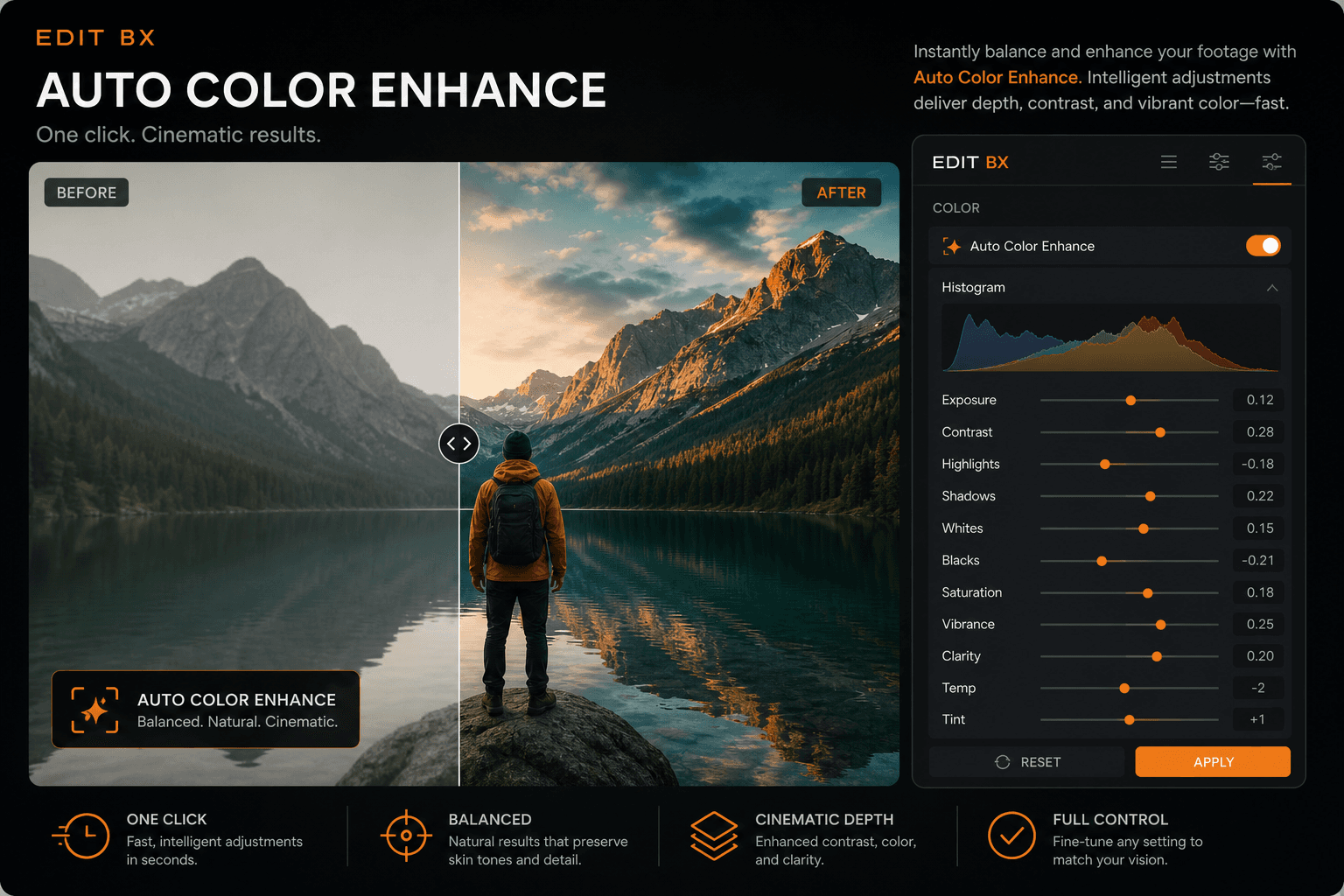
Auto Enhance Color
ColorAvailable

Auto Enhance

Analyze a representative frame and apply balanced exposure, contrast, and color to the selected clip. Multi-zone luma/RGB statistics with adaptive local contrast — no cloud ML, but genuinely useful one-click grade starting point.

Multi-zone luma/RGB stats → clip grade

Auto Beat Cut
AudioHeuristic

Auto Beat Cut

Build a music-driven montage that cuts on detected beats. Uses FFmpeg/DSP onset and energy analysis (not deep learning). Opens the Auto Beat Cut builder with beat markers you can refine.

FFmpeg/DSP beat analysis → cut planner

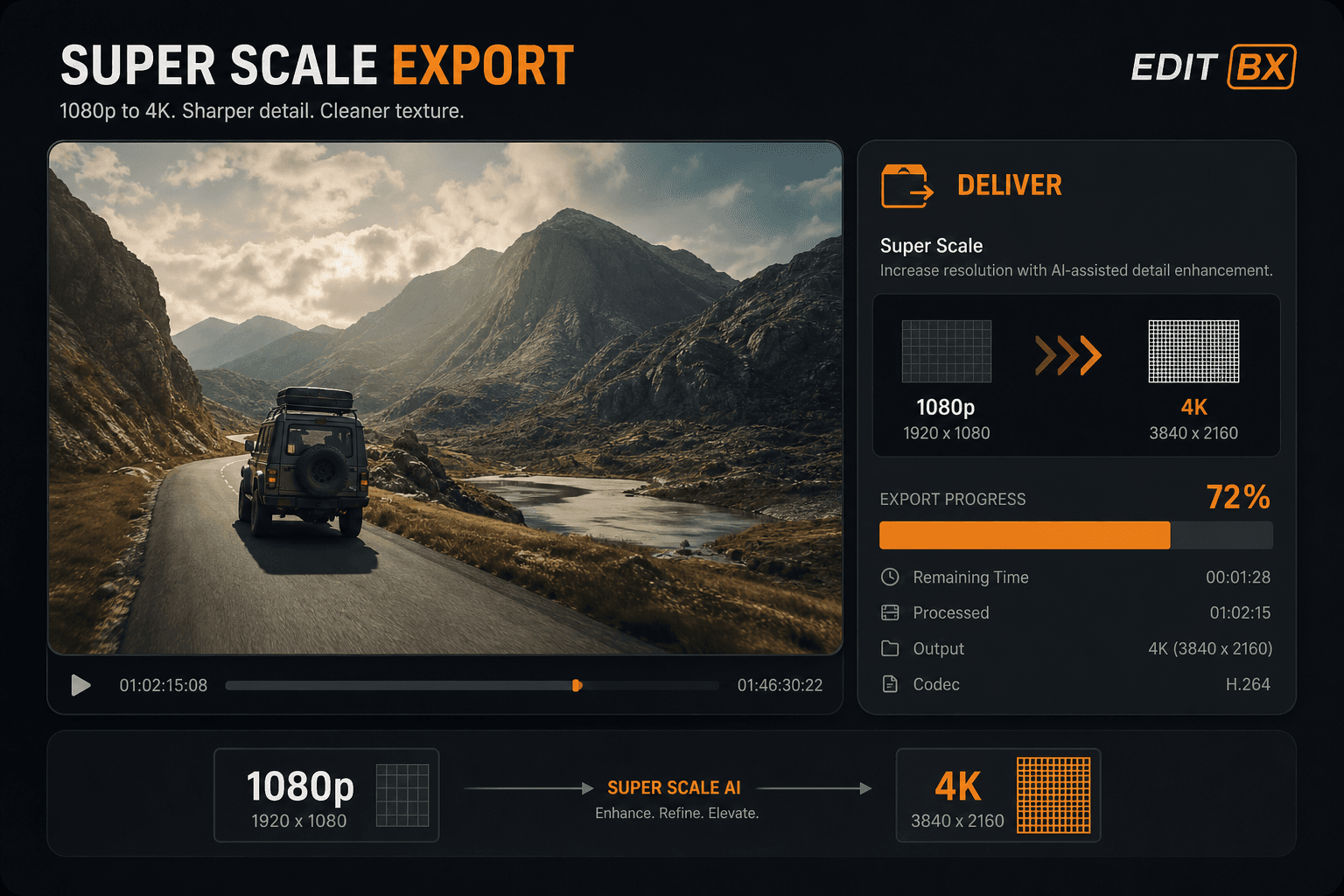
Super Scale ML Denoise
ExportAvailable

Super Scale / ML Denoise

Upscale export resolution 2×–4× with bilateral denoise and sharpen pass on Deliver. Set Super Scale in Project Settings; applied at export time — preview stays fast, export gets finishing quality.

Project Super Scale · bilateral denoise · sharpen on export

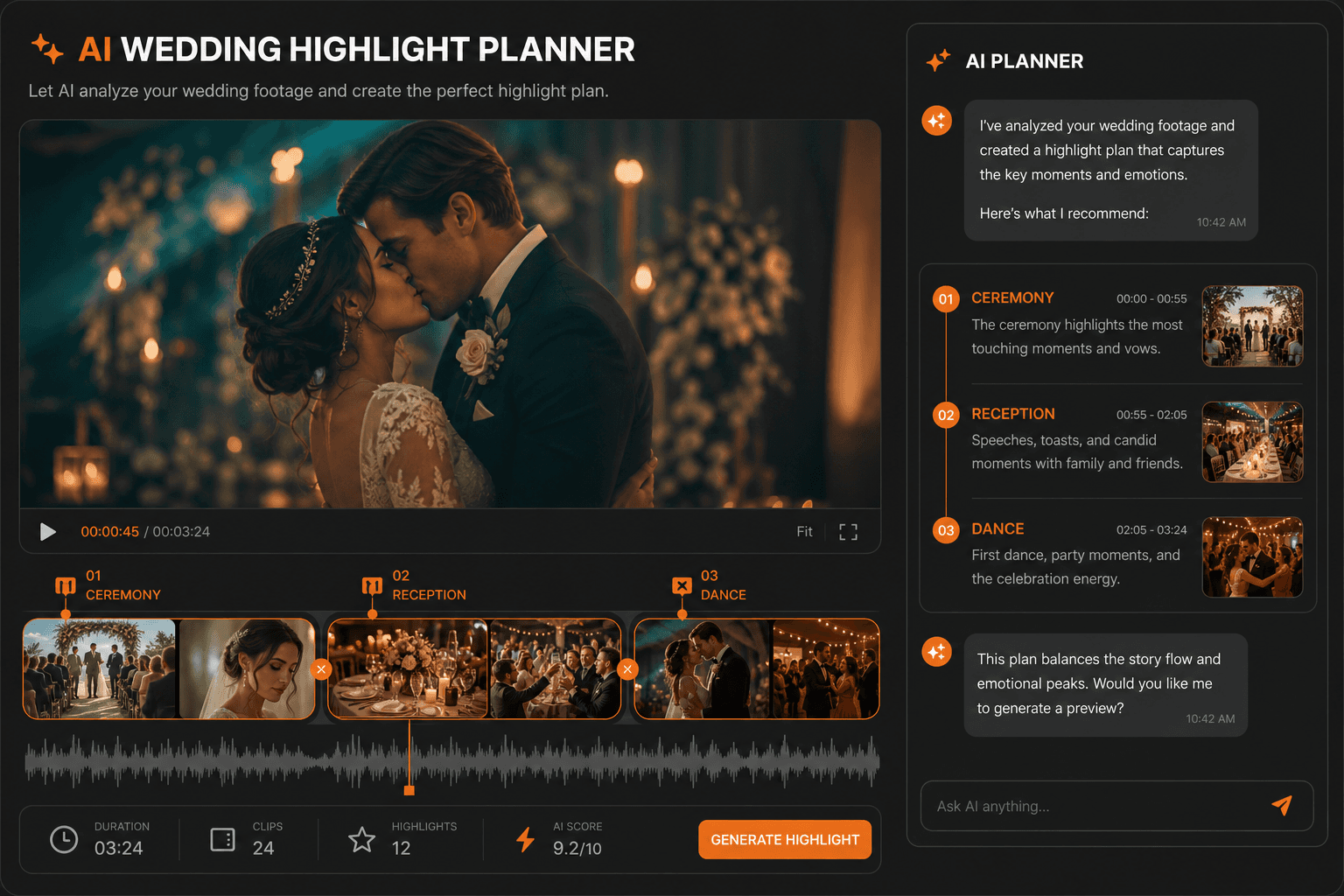
Wedding and Reels Planner
AssistantPro

Wedding & Reels Planner

AI assistant generates structured wedding highlight plans (Ceremony, Reception, First Dance…) and beat-aware vertical reels cut plans from your project context. Apply creates timeline markers — plans are suggestions, not silent auto-edits.

AiStructuredActionParser · WeddingDashboardPanel · marker Apply

AI assistant

AI that assists — you stayin control.

Faster organization, caption drafts, beat hints, and practical suggestions — assistive tools that speed up real sessions.

Explore AI tools
Beat analysis for sync hints
Caption draft via speech-to-text or SRT
Rule-based edit suggestions
Scene cut detection
One-click cinematic look apply
Optional face / people mask assist
AI workflow

AI features arranged forreal editors.

EDITBX presents AI as a controlled assistant layer: analyze, suggest, review, apply. No hidden auto-editing, no confusing magic buttons.

Editor-control promise

Suggestions stay editable
Timeline changes require confirmation
Manual override stays visible
Assistive

AI edit assistant

Suggests timeline actions, cleanup steps, captions, transitions, and delivery checks without taking control away from the editor.

Prompt-guided workflow helpConfirmed actions onlyWorks with real timeline context
Built in

Beat-sync automation

Analyzes music energy, beats, voice onsets, and markers to help build highlight edits and social reels faster.

Beat pointsVoice-aware cutsMarker-driven sequences
Built in

Scene cut detection

Finds visual cut candidates for long footage, ceremony edits, documentaries, and imported reels.

Cut markersReview-first workflowLong footage friendly
Optional

Caption and transcript assist

Supports caption drafts through SRT or speech-to-text workflows so editors can review, correct, and publish clean subtitles.

Caption draftSRT workflowEditor review required
Preview

People mask assist

Uses vision-assisted detection paths for face or people-aware masks, useful for portrait polish and vertical reframing.

Mask hintsPortrait workflowManual override
Guarded

Export safety intelligence

Checks project, cache, proxy, RAM, decoder, and delivery states before final output so client exports stay predictable.

Preflight warningsRecovery-friendlyDelivery manifest
Color dock

Color grading with cinematic control.

LUT import, curves, wheels, scopes, wedding looks, and compare/split grade workflows for fast creative review.

Split compare on
Lift0.02
Gamma0.02
Gain0.02
Waveform
Node 03 · Wedding Warm · Parallel skin key enabled
Clip: Ceremony_A_CAM01Timeline: Full FilmGrade cache: live
Mixer dock

Audio mixing for vows, speeches, and music.

Track meters, gain staging, EQ/compressor/limiter roadmap, LUFS guidance, and practical export audio settings for client delivery.

Live meters
-14 LUFS target
VOW
MS
MSC
MS
AMB
MS
VO
MS
MST
MS
Delivery

Export presets for real platforms andreal clients.

From wedding archive masters to vertical social deliverables, EDITBX keeps export choices visible, understandable, and delivery-safe.

Device 720pDevice 1080pDevice 4KSocial Platforms (9:16)Long-form 1080pLong-form 4KShorts / ReelsVertical SocialBroadcast H.264HEVC High EfficiencyProRes MasterProRes 4444 AlphaAudio WAV MasterCustom

EDITBX is focused on the work wedding studios and social editors repeat every week: bundled delivery, proxy-first editing, live preview, clean licensing, and a focused timeline that keeps the session moving.

Roadmap

Shipping next — already in the branch.

We only put a feature on the website once it's running in our internal builds.

One-click batch social presets

Coming soon

Queue 9:16 Reel, 1:1, 4:5, and 16:9 master from a single timeline. Coming in the next round.

Studio team licensing

Coming soon

Seat sharing, audit log, and remote deactivation for studios with more than 3 workstations.

Pricing

Plans for solo editors andsmall studios.

Clear product tiers with trial, subscription, pro studio, and lifetime licensing paths.

Free Trial

Evaluate EDITBX Studio on real footage before committing.

$014 days
Full timeline editing
Watermarked export
Proxy workflow
Starter wedding template
Most popular

EDITBX Studio

For solo wedding, long-form, and social editors.

$19per month
4K export
Wedding Export Bundle
Multicam editing
Color and audio tools
Background export

EDITBX Pro

For small studios and heavier client delivery.

$39per month
Team-friendly licensing
Advanced export queue
Archive master presets
Priority support
Pack marketplace access

Lifetime License

Own a perpetual license for your editing workstation.

$299one time
Perpetual activation
One year updates
Commercial exports
Online activation
Studio presets
Studios & editors

Trusted on realclient deadlines.

The wedding export bundle queues four delivery files from one sequence — master, archive, reels, and audio — with a manifest. Huge time saver.
PN

Priya N.

Wedding filmmaker · Mumbai

Finally an editor that treats vertical reels and long-form films as the same project, not an afterthought.
JT

James T.

Studio lead · Northlight Films

The interface feels cinematic without hiding the tools. Proxy playback is genuinely smooth on real wedding footage.
SM

Sara M.

Social content editor

FAQ

Questions editors ask beforethey switch.

Straight answers — no marketing fog.

Is EDITBX a real desktop editor?

Yes — a native desktop application built for professional wedding and social video editing on macOS and Windows.

Who is it built for?

Wedding filmmakers, social creators, long-form editors, and small studios that deliver full films, highlights, and reels every week.

How is EDITBX different from general editors?

EDITBX focuses on wedding and social delivery speed — bundled exports, proxy workflows, and a timeline built for repeat client work.

Can I use it for paid client work?

Absolutely. Stable playback, autosave, export safety, licensing, and delivery workflows are built for professional client delivery.

Start editing today

Your next wedding deliverystarts here.

Download EDITBX Studio, activate your license, and build timelines with smooth playback, live preview, and client-ready export bundles — without the overhead of a generalist suite.

14-day trial · No credit card required
Support